
Password manager for one person
Analog Informatics Corporation gives each named user a vault for the passwords and documents that person uses at work. The console name is Secure Share. This page is the individual view: what one person can save, generate, find, and remove. Sharing, encryption, and classification are on their own pages.
Personal password and document collaboration is included with named users on every AIC CMMC Complete package (Cybersecurity Maturity Model Certification, CMMC) and every AIC Enterprise Privilege Suite package. There is no separate personal-vault package. AIC Enterprise Privilege Suite is priced by quote. Administrator and service credentials stay in a separate privileged vault.
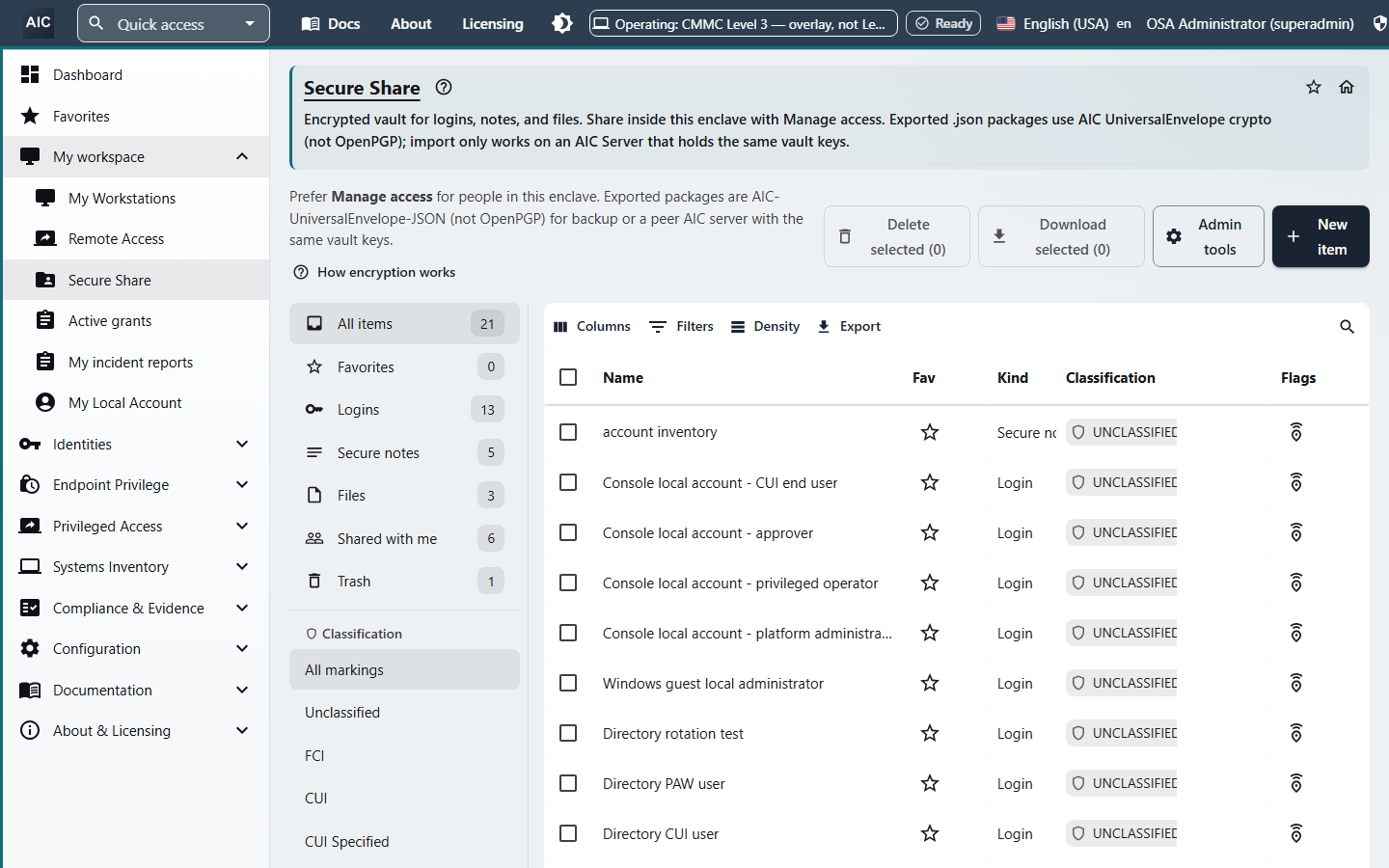
What you can save
| Item | What you enter |
|---|---|
| Login | User name, password, one website address per line, notes, and custom fields. A custom field can be text, hidden, or yes/no. |
| Secure note | Text you want kept with the vault. |
| File | A document stored as a vault item. Each file is limited to 5,242,880 bytes. |
The left side of the vault lists All items, Favorites, Logins, Secure notes, Files, Shared with me, Trash, and a classification filter.
Password and passphrase generator
When you create a login, the vault can generate a password or a passphrase.
- A password can be 12 to 128 characters, with lowercase, uppercase, digits, and symbols, and with ambiguous characters left out.
- A passphrase can be 3 to 10 words, with a separator, optional capitalization, and an optional digit.
- Saving a login can warn, or it can refuse the save, when the password appears in a known-breach list. On an air-gapped system the check uses a local list. When the system can reach the network, the check can use an online list.
Find, copy, and remove
You can mark an item as a favorite and search the vault. Copying a revealed password or note to the clipboard clears that clipboard after 30 seconds. The server decrypts the item for that reveal. See Encryption and classification.
Trash holds an item you remove. You can restore it, or you can delete it permanently.
How a person uses it
- Open Secure Share in the console.
- Create a login, a secure note, or a file, and set the classification.
- Generate a password or type one. A known-breach password can be refused.
- Find the item later from Favorites, a type filter, or search.
- Reveal or copy what you need. The clipboard copy clears after 30 seconds.
What ships, and what is planned
| Capability |
|---|
| Logins, secure notes, and files |
| Password and passphrase generator |
| Breach check when a password is saved |
| Favorites, search, and trash |
Planned
- Browser extension and autofill
- Phone and desktop vault applications
- Authenticator codes and passkeys stored as vault items
- Payment cards and identity records
- Import from another password manager
- Personal folders in the vault
The vault stores website addresses on a login. It does not fill those addresses into a browser.
Sharing with people and groups | Encryption and classification | Vault overview | Request a demo
Copyright 2026 Analog Informatics Corporation. All rights reserved.
For more information about Analog Informatics Corporation, please go to analoginfo.com.